CommitCanvas.
Turn a contribution grid into a canvas. Paint a pattern, preview lettering, and export the Python or Node.js script behind it.
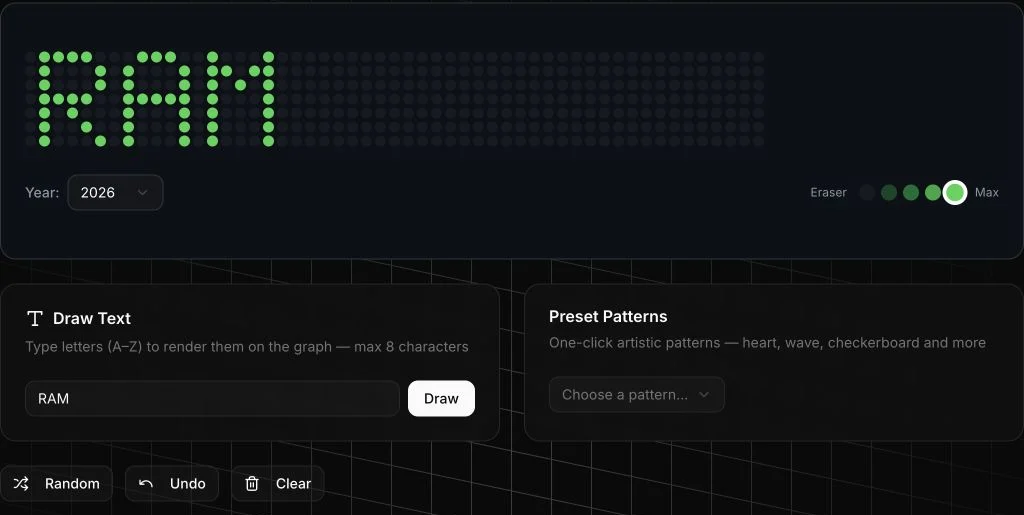
Draw the pattern before writing the script.
A contribution graph has a small, fixed surface. CommitCanvas makes it editable: compose a pattern visually, then inspect the code that turns its painted cells into dated commits.
- WHO IT’S FOR
- People exploring contribution-graph artwork.
- THE CONSTRAINT
- Weeks, days, and intensity have to become dates and commit counts without losing the pattern.
The picture is also the input.
Drawing, lettering, and presets all change the same grid. The preview stays close to the input, while the export makes the translation into code visible.
Keep the hand close to the result
Painting changes the grid itself. Intensity, text, and preset patterns all write into the same surface, with undo keeping experimentation reversible.
Make the translation visible
The export turns painted cells into dates and intensity levels, then produces Python or Node.js. The generated script can be read before it is run.
A square becomes a date.
Inside the export loop, the cell’s column and row determine its date. Empty cells are skipped; painted cells carry their intensity into the generated output.
const level = grid[day][week]
if (level > 0) {
  const date = new Date(startDate)
  date.setDate(date.getDate() + week * 7 + day)
  dates.push({ date: date.toISOString().split("T")[0], level })
}- Position → date
- The week and day locate a square within the selected year’s grid.
- Intensity → output
- The stored level drives the number of dated commits in the generated script.
A live editor. An inspectable export.
In the recorded live-editor check, entering “RAM” and pressing Draw produced the green letter pattern shown above.
Exported commits create artwork. They do not document prior coding activity.
Take a closer look.
- Choose a year and a drawing intensity.
- Paint a few squares, try lettering, and undo a change.
- Switch between Python and Node.js output to inspect the export.
Sources, credits & review notes
Contribution & credits. Project author, credited in the public repository.
The product capture was taken from the live editor on 18 September 2026. The source supports painting, intensity controls, text, presets, undo, and script generation; exported scripts were not executed during this review.
The exporter constructs local dates and serializes them to UTC. Behavior across time zones and the final pattern rendered by GitHub have not been verified.
PUBLIC SOURCE REVIEWED / 18 SEPTEMBER 2026AN INVITATION TO PLAY / COMMITCANVAS
Make your mark.
A little experiment from CommitCanvas. Stamp your initials, lift the relief, keep the print.
Eighteen across. Seven down. A small space to make something your own.
Precise pixel editor
Start with a mark. Make it yours.
Draw individual pixelsLarge squares. Room to experiment.
Drag with a mouse or tap a square. Scroll sideways to reach the whole grid. For keyboard editing, use the row and column controls in the precise pixel editor above.
33 of 126 squares marked. Changes appear in your relief above.
Your mark stays with you as you explore this tab; reloading starts fresh. Decorative art, with no GitHub activity or server upload.
Take the idea. Leave your mark.